These instructions detail how Centre-based Users, including Candidates, can apply snippets (pre-defined text or forms) when using the integrated word processor.
Note: When using the word processor use the following tool button to view a list of the snippets available to you, simply click on the snippet you wish to use.
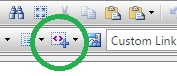 The snippet tool button within the text editor.
Once a snippet has been applied it can be edited and saved as required.
Was this article helpful?
That’s Great!
Thank you for your feedback
Sorry! We couldn't be helpful
Thank you for your feedback
Feedback sent
We appreciate your effort and will try to fix the article