Adding / Editing Snippets:
You will require one of the following roles to add/edit/delete snippets:
CMS Administrator
Learning Support Administrator
Quality Assurer
Snippets can be added to your Centre’s system account for Centre-based staff to apply whenever they are accessing the integrated text editor / word processor within Ecordia. Click here to see how to use a snippet.
Use snippets to insert adhoc forms into the system, or providing Centre staff with access to useful web links or responses to frequently asked questions, which can be added to their entries when preparing feedback, assessment plans or creating system messages.
There is no specified limit to the number of snippets you can add, it all depends on your browser memory. The larger the snippet the less responsive your browser could become, so where possible, keep snippets as short as possible, and avoid using too many tables, as these are particularly complex for your browser to render.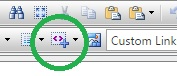 The snippet tool button within the text editor.
1. Go to the "My Centre" tab, then select the "Snippets" tab. You will now be viewing snippets for your Centre and a word processor for you to add a Snippet.
2. Add your Snippet in the word processor provided and name your Snippet in the space provided on the left. The name of the each Snippet must be unique because it is the Snippet name which will enable users to know which Snippet to use. Snippets can be text or forms and can be edited or completed by Users when applied to the word processor.
3. When you have entered your Snippet click ‘Add’ to make it available to Centre Users.
4. Having saved the Snippet you can use the ‘Edit’ button to make changes to a Snippet and use the ‘Update’ button to save your changes.
5. Snippets can also be deleted using the ‘Delete’ button provided.
Centre Users can access the Snippets by using the ‘Snippet tool’ button - located in the word processor tool bar, as show in the image above.
Keywords: add snippet, new snippet, edit snippet, change snippet, delete snippet, remove snippet
Was this article helpful?
That’s Great!
Thank you for your feedback
Sorry! We couldn't be helpful
Thank you for your feedback
Feedback sent
We appreciate your effort and will try to fix the article