The selected units for a portfolio are displayed on the Portfolio Front page .
Selected units are grouped by learning aim with progress for each learning aim, and progress for each unit, and the available units is subject to the Course set-up .
A pen icon indicates that the unit has reached 100% and is now being confirmed complete by the assessor, candidate and IQA in that order. You can place your cursor over the pen to see who is holding the unit completion declaration .
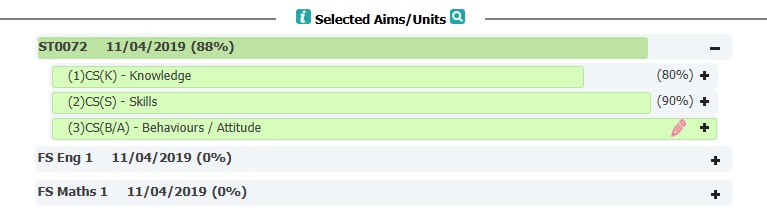
If your course has more then one learning aim, click on the + to expand the section to view unit progress.
Click the  to view a list of all the active units. You can then click on a unit to view the Unit comments screen
Click the  to view a list of all units, and selecting a unit will take you to the Evidence Summary page for the unit
Note: Unit % on the front page is the % complete, whereas the % on Evidence Summary page (  ) is the % covered. These are usually the same, unless you have special evidence requirements for a unit and/or a given number of criteria need to be covered from a list. i.e 8 of 12 need to be covered 3 times before the part is complete. This is a common scenario in Engineering qualifications.
Learn more about select units here
1. Add or remove selected units (add units / remove units):
1.1 Go to the Portfolio Front page, and click 'Individual Learning Plan', then 'Modify ILP'
1.2 Tick and un-tick units as required (you can also edit a unit target date and change the unit assessor)
1.3 Click 'Save' at the bottom of the page to save your changes. On screen warnings will be displayed if your unit selections do not meet the rules of combinations or selection criteria, in which case return to set 1.2 to change your selections.
2. Unit Assessor
When setting up a portfolio, or when modifying an ILP, unit assessors can be selected for different units.
A unit assessor will have full access to the portfolio to add plans, and to prepare and assess evidence.
When a unit reaches 100% the unit declaration will be sent to the selected unit assessor.
If using unit assessors extensively, for planning and assessing, you might want to consider changing the 'When evidence is presented, send it to' control on the Course, to 'Plan Author'. This will mean that if a unit assessor creates a plan, when any evidence which is linked to the plan is presented, it will go to the plan author rather than the Primary Assessor.
If you select 'Unit Assessor' for 'When evidence is presented, send it to', the evidence can only go to one unit assessor. Therefore, this will only work if the evidence is linked to one or more units with the same unit assessor. If there is more than one unit assessor, then the evidence will be presented to the Primary Assessor.
Was this article helpful?
That’s Great!
Thank you for your feedback
Sorry! We couldn't be helpful
Thank you for your feedback
Feedback sent
We appreciate your effort and will try to fix the article