When evidence is submitted by the candidate, the following declaration can be completed:
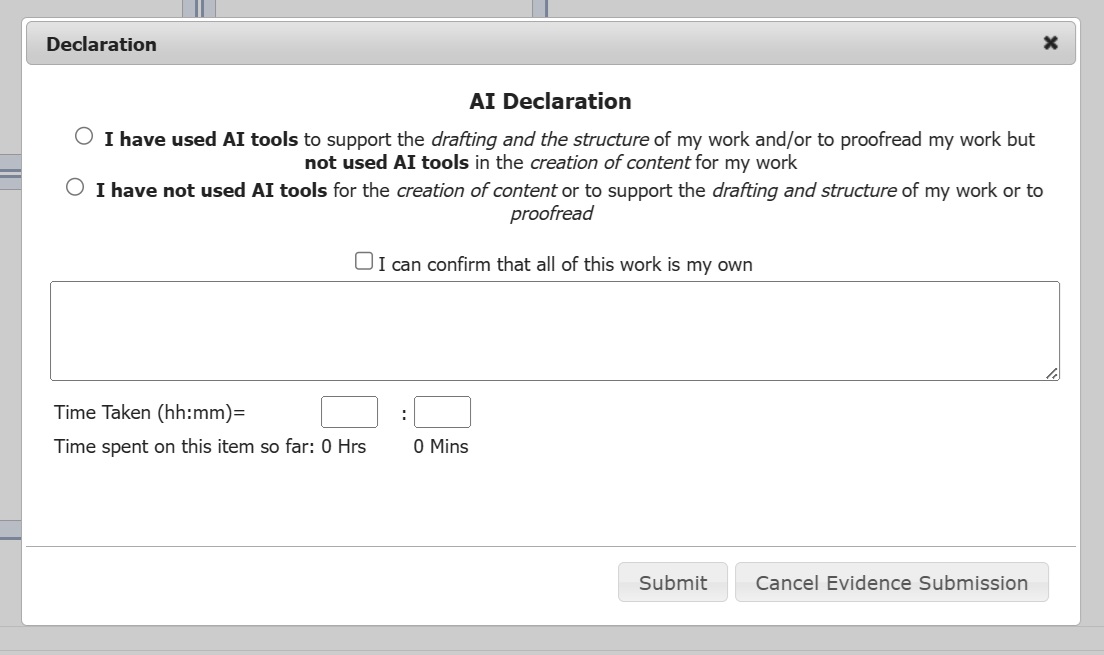
1.1 If the candidate selects either 'I have used...' or 'I have not used...', their selection is then displayed at the bottom of the evidence data
1.2 The candidate can also tick to confirm 'I can confirm that all of this work is my own'. but this is not currently displayed anywhere.
1.3 If the candidate adds a comment, then it will be displayed at the bottom of the evidence data above their AI declaration.
2. To make the declaration mandatory, an administrator at your centre will need to:
2.1 Go to Course Admin/Courses menu,
2.2 Select the course
2.3 Click 'Modify' and ticket the Mandatory Evidence Sources/References option
2.4 Click 'Save'.
Was this article helpful?
That’s Great!
Thank you for your feedback
Sorry! We couldn't be helpful
Thank you for your feedback
Feedback sent
We appreciate your effort and will try to fix the article